

SketchUp Free Shares How to Find and Download Quality 3D Models for SketchUp Projects
Downloading quality SketchUp models for professional projects requires knowing where to find reliable sources and how to evaluate each .skp file before importing. A standard SketchUp model is an .skp file containing 3D geometry, assigned materials, and textures, all structured for use in architectural visualization and interior design workflows.
However, most free SketchUp models available for download online are not fully optimized for rendering. Common issues include polygon counts exceeding practical limits for smooth viewport performance, missing or incorrectly assigned textures, and hidden-geometry errors that cause rendering software to crash or produce visual artifacts.
From our experience curating a render-ready collection of free SketchUp Free models, we have identified three factors that consistently determine whether a free sketchup model download will perform well in a professional scene: polygon count, texture assignment, and renderer compatibility. This article breaks down where to find high-quality 3D models, how to evaluate them, and the workflow for importing them correctly.
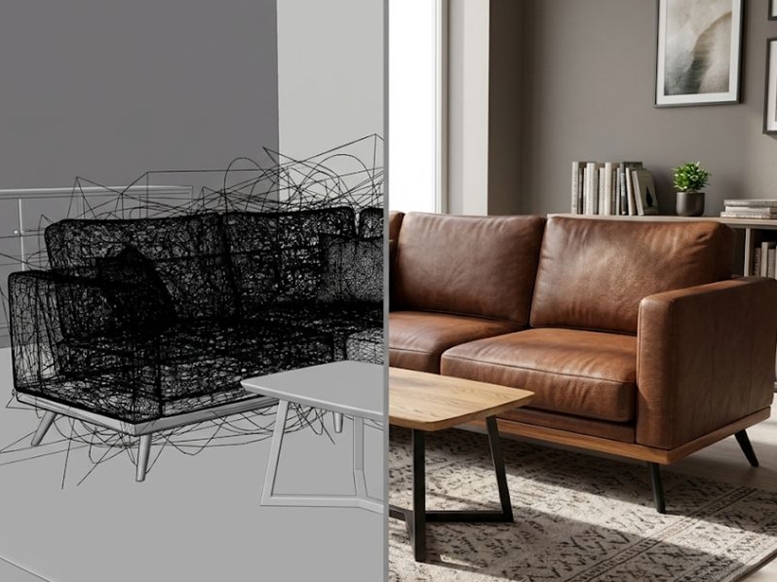
A stark contrast between messy wireframe geometry and a fully optimized, render-ready 3D model.
Where Architects Find Reliable SketchUp Models for Free Download
For a reliable free sketchup model download, architects and digital artists primarily rely on five major platforms: 3D Warehouse, SketchUp Free, CGTips, SketchUp Texture Club, and SketchUpBox.
A truly dependable 3D library prioritizes render readiness, strict file-format consistency, rigorous polygon optimization, and active database maintenance to prevent workspace crashes and geometry errors.
Here is a breakdown of the top industry sources:
- 3D Warehouse: The official Trimble repository offering massive volume, spanning full architecture to raw site components. Accessed via 3d warehouse sketchup searches, it requires a free Trimble account and provides unmatched variety, though model optimization varies wildly.
- SketchUp Free: A curated open library delivering exclusively render-ready furniture and PBR materials. Users can execute a sketchup 3d model free download with zero account registration. Its ultimate advantage is pristine, zero-cleanup geometry natively optimized for engines like V-Ray and Enscape.
- CGTips: A highly regarded platform specializing in complete interior scenes and decorative sets. Files are typically pre-configured for V-Ray or Corona. A registered account is required to access the files, making it excellent for studying professional visualization setups.
- SketchUp Texture Club: Famous for seamless textures, this site also hosts a solid collection of architectural components and furniture. Free membership requires registration and imposes a daily download limit, yet it remains a staple for correctly mapped surfaces.
- SketchUpBox: A specialized repository offering well-organized residential and commercial furniture models. Downloads generally require no authentication, providing a streamlined experience for acquiring quick, standardized .skp files.
Selecting the best source for architectural visualization ultimately depends on specific project demands. Professionals often leverage 3D Warehouse for massive volume, CGTips for studying full interior scenes, and SketchUp Free when they need instantly render-ready assets that save valuable project time.
How to Evaluate a 3D Model Before Downloading
Professionals can evaluate a 3D model before downloading by verifying three core criteria: polygon count, texture assignment, and render compatibility. Polygon count is the total number of faces or triangles in a model. For smooth viewport performance, furniture models should stay between 5,000 and 50,000 polygons, complete interior scenes between 200,000 and 500,000, and architectural exteriors between 100,000 and 300,000. Models that exceed these ranges slow down the viewport or crash the software during rendering.
Texture assignment determines whether a model arrives with materials already applied or requires manual setup after import. A render-ready model has materials correctly assigned to every surface, UV mapping is accurate, and geometry is clean with no inverted faces or hidden errors. Models with missing textures force the designer to manually create and assign materials before the file produces any usable render output. For projects requiring high-quality material libraries alongside geometry, a sketchup texture model download from a curated source provides PBR-grade seamless textures ready to apply to imported models without additional UV mapping work.
Render compatibility refers to whether the model works correctly in the designer’s chosen rendering engine. A model built for V-Ray may not display materials properly in Enscape or Lumion without adjustments. Checking renderer compatibility before downloading prevents rework after import.
To guarantee this level of reliability, SketchUp Free enforces a rigorous “test-rendered” standard, ensuring that every asset is thoroughly tested with industry-leading engines such as V-Ray, Enscape, and Lumion before public release.
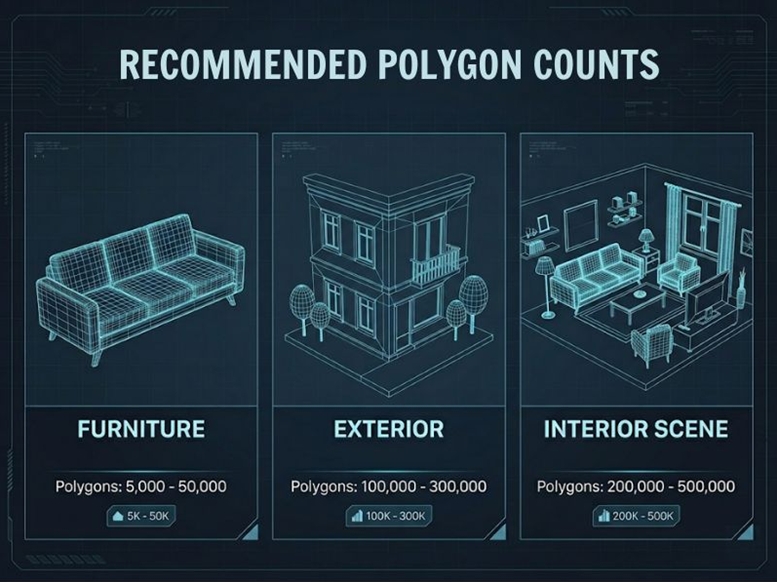
A quick reference guide for recommended polygon counts to ensure optimal rendering performance.
Step-by-Step Workflow to Download and Import SketchUp Models
A well-structured download workflow prevents most geometry and material issues from reaching the rendering stage. The SketchUp Free team follows a 4-step process when sourcing models for architectural visualization projects.
- Step 1: Search with specific keywords. Generic searches like “chair” or “table” return thousands of irrelevant results on any 3D library. Effective search queries combine the object name with a qualifier — “modern dining chair sketchup” or “minimalist floor lamp .skp” produces far more targeted results. On platforms like sketchup 3d model free download at SketchUp Free, categories are pre-organized by room type and function, which reduces search time.
- Step 2: Evaluate before downloading. Check 3 specifications on the model preview page: polygon count (furniture models should stay under 50,000 faces for smooth viewport performance), file format (.skp version — a model saved in SketchUp 2024 cannot open in SketchUp 2021), and whether materials are pre-assigned or require manual texturing after import.
- Step 3: Download and extract. Most free libraries deliver .skp files inside compressed .rar or .zip archives. Extract the archive first, then verify the .skp file opens correctly as a standalone model before importing it into a production scene. This prevents corrupted geometry from contaminating larger project files.
- Step 4: Import and verify in SketchUp. Use File > Import (not File > Open) to place the model into an existing scene. After placement, check the component structure through Window > Entity Info and run View > Hidden Geometry to reveal any hidden faces or edges. For models from curated libraries that apply render-ready standards, cleanup steps like “Purge Unused” are typically not needed since geometry and materials are already configured.
Common Mistakes When Downloading Free SketchUp Models
Through years of industry observation and practical rendering experience, the expert team at SketchUp Free has pinpointed three workflow errors that consistently sabotage architectural visualizations. Drawing from this insider perspective, we are sharing these distilled lessons to help digital artists avoid the most common downloading pitfalls: ignoring .skp version compatibility, skipping critical geometry checks, and importing overly heavy assets directly into master scenes.
- Ignoring .skp version compatibility: SketchUp files are backward-compatible but not forward-compatible. A model saved in SketchUp 2024 cannot be opened in SketchUp 2021, making version verification essential before initiating a download.
- Skipping the hidden geometry check: Concealed faces and edges are invisible in standard viewports but are fully calculated by rendering engines, inflating render times and causing visual artifacts. Running View > Hidden Geometry reveals these errors before they contaminate your file.
- Importing high-poly assets directly: Dropping a 500,000-polygon model straight into a complex 2-million-polygon master project often triggers severe lag or total software crashes. Professionals should always open the downloaded file separately to optimize it before utilizing the import function.
Relying on curated open libraries eliminates these technical risks entirely. Platforms like SketchUp Free bypass this tedious troubleshooting process by transparently displaying the exact .skp version, precise polygon count, and verified renderer compatibility directly on every asset’s download page.
About SketchUp Free
SketchUp Free is a free 3D asset library providing render-ready .skp models and seamless PBR textures for architects, interior designers, and 3D visualization professionals. The library covers two main sections: 3D Models (furniture, architecture, interior scenes, lighting, decoration) and Textures (wood, stone, marble, concrete, brick, tile, metal, fabric), with stated compatibility for V-Ray, Enscape, Lumion, D5 Render, and Corona. The collection is actively maintained with new models and textures added on a regular basis.
Visit us on social media:
Media Contact
Company Name: SketchUp Free Ltd
Email: Send Email
Phone: 15753839388
Address:130 W 2nd St
City: Los Angeles
State: CA 90012
Country: United States
Website: https://sketchupfree.com


