

“Perpetual” Never Meant Permanent: Millions of Office 2021 Users Have Seven Weeks Before the Updates Stop
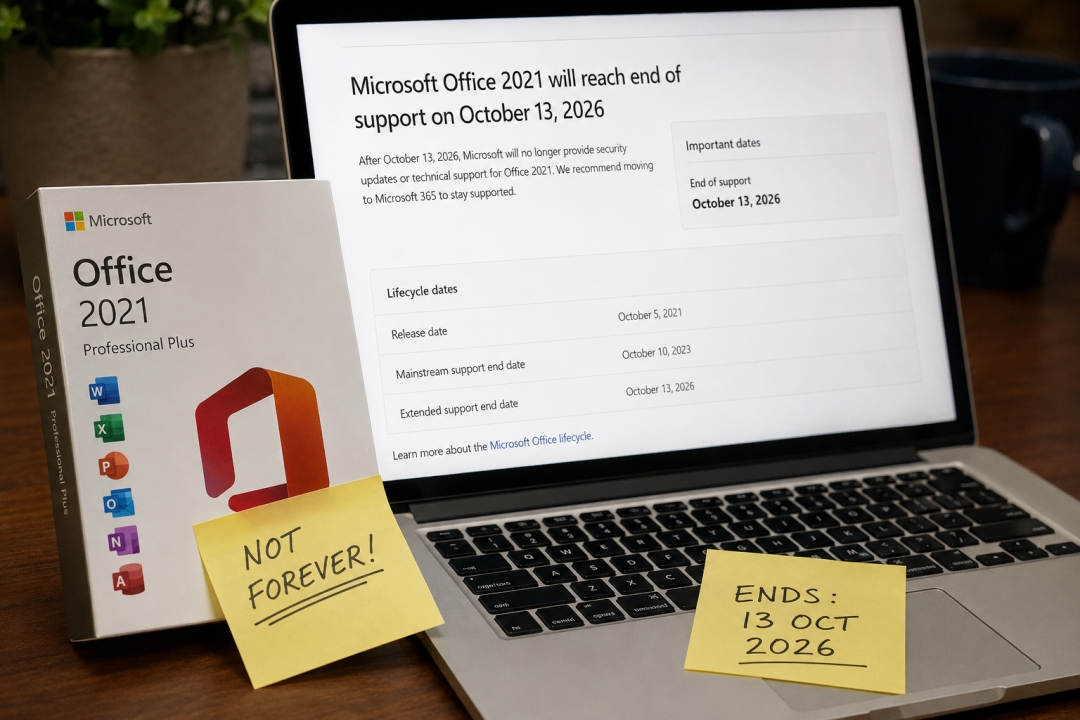
LONDON, UNITED KINGDOM – 24 Aug, 2026 – Nothing will visibly happen on 14 October 2026. Word will open. Excel will calculate. Outlook will send. No warning banner will appear, no dialog box will interrupt anyone’s morning, and no invoice will arrive demanding a renewal.
That silence is the whole issue. Microsoft Office 2021 reaches end of support on 13 October 2026, and from that day forward every security flaw discovered in Word, Excel, PowerPoint, Outlook or Access stays open forever. The applications do not degrade, expire, or announce themselves. They simply become an unpatched attack surface that looks identical to a healthy installation.
UK software licence retailer WinCDKey has published support-lifecycle disclosures across its catalogue ahead of the deadline, and is urging buyers of perpetual Office licences to check what they own before autumn rather than after.
The word that caused the confusion
Office 2021 was sold as a perpetual licence — the alternative for people who did not want a subscription. Buy once, own it, no monthly fee. For a great many small businesses, freelancers, schools and households, that was the entire appeal.
“Perpetual describes how long you may use the software. It has never described how long the manufacturer will patch it,” said A.Hossain, CMO at Wincdkey Ltd. “Two completely different clocks, one word doing the work of both. Most people find out they were different when it is already too late to plan calmly.”
There is a second layer to the surprise. Perpetual Office releases historically carried a ten-year lifecycle: five years of mainstream support, then five years of extended support. Starting with the 2021 generation, Microsoft removed the extended phase altogether — halving the supported lifespan. Anyone who bought Office 2021 assuming it would behave like Office 2016 or Office 2013 has roughly five years less runway than they budgeted for.
The same date catches Office LTSC 2021, the Long-Term Servicing Channel edition that organisations specifically chose for stability and longevity. “Long-term” now means five years. Microsoft Publisher reaches end of life on the same day, after which no version of Publisher will be supported at all.
And unlike Windows 10, there is no escape hatch. No extended support phase, and no paid Extended Security Updates programme to buy another year with. 13 October is the end of the line.
The people least likely to notice
The customers most exposed to this deadline are, by an uncomfortable logic, the ones who made the most deliberate decision. Subscriptions announce themselves — a card gets charged, an email arrives, a renewal lapses. Perpetual software is silent by design.
That silence lands hardest on the buyers who chose perpetual precisely to avoid ongoing vendor contact: the sole trader running invoicing out of Excel, the two-room clinic, the school department that bought a batch of licences in 2022 and has not thought about them since, the parent who bought Office once for a laptop and expected it to last the child’s degree.
For anyone handling personal data, card details or health records, the question extends past security into compliance. Most information-security frameworks take a dim view of unpatched vendor software. That judgement belongs to each organisation’s own compliance function — but it is a far easier conversation to have in September than in November.
Still selling it, and saying so
WinCDKey continues to stock Office 2021, and is explicit about why. An unsupported licence remains a legitimate low-cost option for the right job — an offline machine, an air-gapped lab, a short deployment with a known end date, hardware that will be replaced anyway. It is a poor choice for a daily-driver machine opening email attachments from strangers.
“We would rather sell someone the cheap unsupported edition knowingly than sell them the same thing and quietly hope they never check the date,” said Stave. “The second version comes back as a refund request and a lost customer about a year later. We have seen enough of those tickets to know how that ends.”
The company has moved end-of-support dates onto product listings next to the price, rather than leaving them in terms-and-conditions text — covering Office 2021 (13 October 2026), Office 2016 and Office 2019 (support ended October 2025), Windows 10 (support ended October 2025), and Windows Server 2019 (mainstream support ended January 2024, extended to January 2029).
What to do with seven weeks
There are four honest paths. Staying on Office 2021 past October is defensible for offline or low-exposure use and buys testing time. Moving to Office 2024 keeps the one-time-purchase model and carries support to 9 October 2029 — the direct successor for home users and small offices. Office LTSC 2024 suits managed environments needing a stable non-subscription release. Microsoft 365 trades the support cliff for a continuing subscription and Microsoft’s rolling changes.
One relief: Office 2021 files open normally in Office 2024. Unlike CAD and BIM software, where a version jump can strand a user’s own work in an unreadable format, this migration carries no file-compatibility penalty.
Comparison guidance is available in WinCDKey’s Office 2024 edition comparison and setup instructions in its Office 2024 installation and activation guide. Lifecycle disclosures for every affected edition appear on the current Back to School Sale page.
For anyone who cannot migrate in time: patch the operating system fully, disable macros from untrusted sources, restrict Office to documents from known senders, and keep backups somewhere other than a single cloud folder.
About Wincdkey Ltd
Wincdkey Ltd (Company No. 15530488) is a digital software licence retailer registered in England and Wales, trading at wincdkey.com from 71–75 Shelton Street, Covent Garden, London, WC2H 9JQ. The company supplies Microsoft, Autodesk, EaseUS and security software licences by email delivery, and has served more than 600,000 orders to over 400,000 regular customers, with more than 2,500 verified reviews published on Trustpilot. Wincdkey Ltd is listed in the Microsoft AppSource partner directory. Support is available through the Help & Support Centre.
Media Contact
Company Name: Wincdkey Ltd
Contact Person: Lashaunda Smith Director, Wincdkey Ltd
Email: Send Email
Country: United Kingdom
Website: https://wincdkey.com/


